Deploy a Vite or React AppBuild Once, Upload the dist Folder
A Vite or React project isn't a website until it's built — upload the project folder anywhere and you get a blank page. Run two commands, upload the dist folder, and your app is live on its own https address. No GitHub, no build server, no config.
- Time
- About 3 min
- Steps
- 4
- Plan
- Free
- Updated
- Sep 23, 2026


Before you start
- Your Vite or React project on your computer
- Node.js installed — it comes with
npm - A free Dplooy account
In this guide
How to deploy a Vite or React app, step by step
- 1
Build the app: npm install, then npm run build
Open a terminal in your project folder — the one with
package.jsonin it — and run the two commands.npm installdownloads the packages your app uses;npm run buildturns your JSX or TypeScript into plain HTML, CSS and JavaScript that any browser can run.When it finishes you have a new folder called
dist(Create React App calls itbuild). That folder is your website: anindex.htmland anassetsfolder with your bundled code.Terminal — inside your project folder $ npm install$ npm run build
- 2
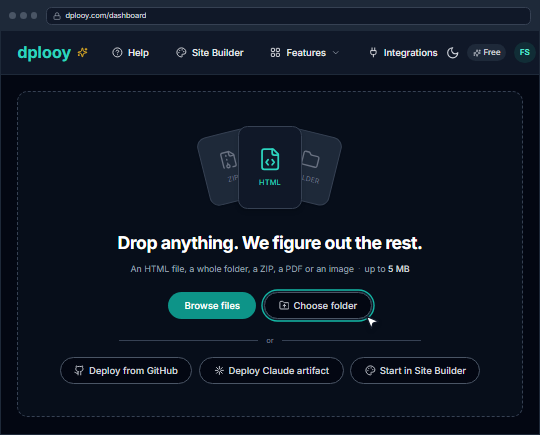
On your dashboard, click “Choose folder” and pick dist
Sign in to Dplooy. Under the drop zone, click Choose folder and select the
distfolder — or dragdiststraight onto the drop zone. Pickdistitself, not the project folder around it.Your browser may ask whether to upload the folder's files — that's it confirming the folder, and only
distis sent.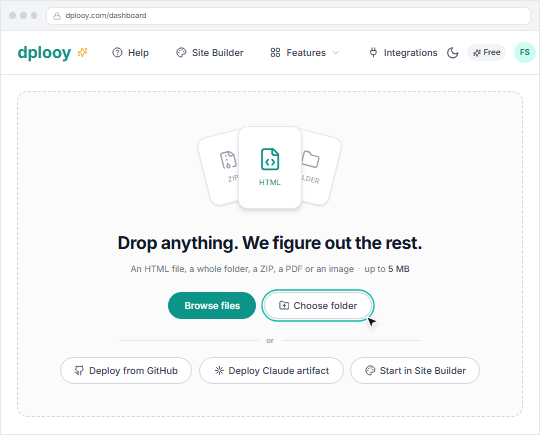
- 3
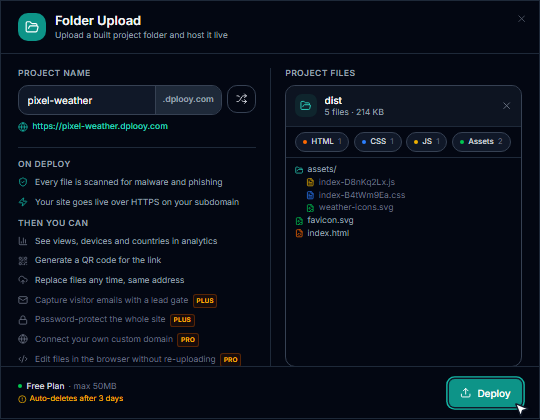
Name your app and click Deploy
The Folder Upload window lists what it found — for a Vite build, one HTML file, your CSS and JavaScript, and a few assets. Type a Project Name (it becomes your address, like
pixel-weather.dplooy.com) and click Deploy.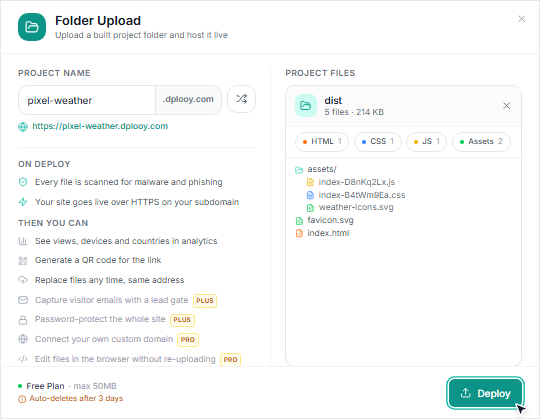
- 4
Open your live app
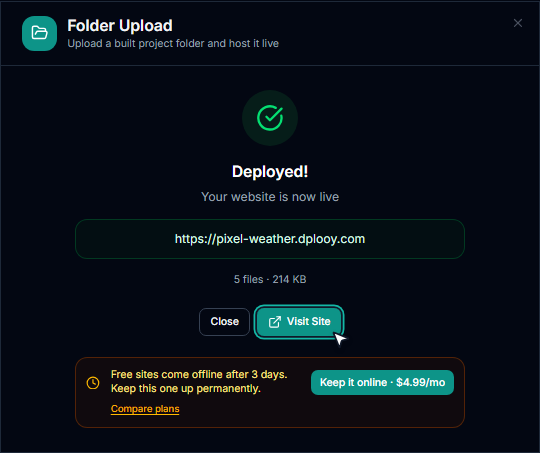
Click Visit Site — your app loads at its https address. Refresh any page or share a deep link: client-side routes from React Router work, because Dplooy serves your app for them.
Changed the app? Run
npm run buildagain, open the site and use Replace files under Deploy to upload the newdist— same address. On the Free plan a site stays online for 3 days; Plus ($4.99/month) keeps it up for good and removes the badge.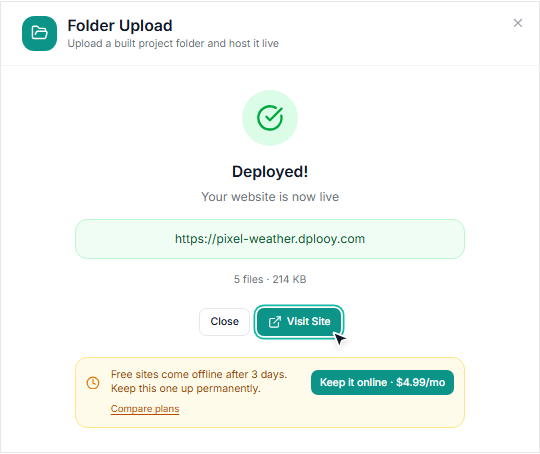


Why a Vite or React app shows a blank page
Your project's index.html loads /src/main.jsx — code a browser can't run until Vite compiles it. Upload the project folder to an ordinary host and the page stays blank. Upload it to Dplooy and nothing is deployed: you get the exact build commands for your framework instead.


Don't upload — the project folder
- pixel-weather/
- node_modules/
- public/
- src/
- App.jsx
- main.jsx
- index.htmlloads /src/main.jsx
- package.json
- vite.config.js
Upload — the dist folder the build made
- dist/
- assets/
- index-D8nKq2Lx.js
- index-B4tWm9Ea.css
- weather-icons.svg
- favicon.svg
- index.htmlloads /assets/index-D8nKq2Lx.js
No base setting is needed: your app lives at the root of its own address, so the /assets/… paths Vite writes by default just work. Code on GitHub? You can also deploy from GitHub and have the build run on GitHub for you.
Build commands for Next.js, Vue, Svelte, Astro, Nuxt and Angular
Every framework works the same way: build once, upload the output folder. These are the commands the Dplooy dashboard gives you when it spots each one.
- Next.jsIn next.config.js add: output: 'export'
npm installnpm run buildStatic export only — API routes, middleware and server-side data fetching do not run on static hosting.Uploadout - Vite
npm installnpm run buildUploaddist - React
npm installnpm run buildUploaddist (Vite) or build (Create React App) - Vue
npm installnpm run buildUploaddist - Svelte
npm installnpm run buildUploaddist - Nuxt
npm installnpm run generateUploaddist - SvelteKit
npm install -D @sveltejs/adapter-staticIn svelte.config.js use adapter-staticnpm run buildUploadbuild - Astro
npm installnpm run buildUploaddist - Angular
npm installng buildUploaddist/<project>/browser - RemixRemix needs a server to run and has no static export. It cannot be hosted as static files.
Vite or React deploy not working? Fixes
You uploaded the project folder
This is a Vite project, not a built site. Nothing was uploaded.
- Run
npm run buildand choose thedistfolder inside the project instead. A blank page after deploying
- Open the browser console (F12). An error loading
/src/main.jsxmeans the source was uploaded — uploaddistinstead. 404s for files under/assets/usually meanbaseinvite.config.jswas set for a sub-folder host like GitHub Pages; remove it or set it to/, then build again. The terminal doesn't know npm
npm: command not found · 'npm' is not recognized as an internal or external command
- Node.js isn't installed. Install the LTS version from nodejs.org, open a new terminal and run the commands again.
Refreshing a page gives a 404
- Not on Dplooy. A build with one
index.htmlplus JavaScript is served as an app, so every page address loads it and React Router takes over. You don't need the_redirectsor404.htmltricks other hosts ask for. Environment variables are empty in the live app
- Vite writes
VITE_-prefixed variables into the build when you runnpm run build— put them in.envor.env.productionbefore building. Never put secret keys there: anything in a front-end build is visible to visitors. The build has too many files
Folder contains 120 files, exceeding your free plan limit of 50 files
- Create React App writes a
.mapfile for every script — setGENERATE_SOURCEMAP=falsebefore building. Otherwise Plus allows 100 files and Pro any number.
Frequently asked questions
How do I deploy a Vite React app?
Run npm install and npm run build in the project folder, then upload the dist folder the build creates. On Dplooy: click Choose folder on your dashboard, pick dist, name the app and click Deploy — it's live in under a minute.
Why is my React app blank after deploying?
Because the source was uploaded instead of the build. The project's index.html points at /src/main.jsx, which only runs inside Vite's dev server. Build the app and upload dist (or build for Create React App).
Can I deploy a React app without GitHub?
Yes. Build it on your computer and upload the dist folder from your dashboard — no repository, no Git and no CI needed. If your code is on GitHub you can also deploy from GitHub and let the build run on GitHub.
Which folder do I upload — dist or build?
Vite puts the finished site in dist; Create React App uses build. Next.js static export uses out, SvelteKit build and Angular dist/<project>/browser. Upload the folder that has index.html at the top.
Does React Router work on Dplooy?
Yes. A build with one index.html and JavaScript is served as an app: refreshing /about or opening a shared deep link loads your app and React Router shows the right page. Missing images and files still return a real 404.
Can I host a Next.js app?
Yes, as a static export: add output: 'export' to next.config.js, run npm run build and upload the out folder. API routes, middleware and server-side rendering need a server and don't run on static hosting.
Is it free?
Yes, on the Free plan — up to 3 sites, each online for 3 days, with a small Dplooy badge. Plus ($4.99/month) keeps apps online for good without the badge. Every plan includes unlimited traffic.
How do I update my app after it's live?
Run npm run build again, then use Replace files under Deploy on the site to upload the new dist. The address stays the same, and Plus and Pro keep your previous version so you can roll back.
Can I use environment variables?
At build time, yes: Vite includes VITE_-prefixed variables in the build. There's no server to read variables at runtime, so never put secret keys in a front-end app.
Put your app online
Free account. Upload dist, get a live link in under a minute.