Build a Website with an AI Agent
One conversation takes your business from an idea to a live website — built, hosted, and running real forms, bookings and editable content. This is the complete guide: how to connect, what to say, and exactly what happens behind the scenes.
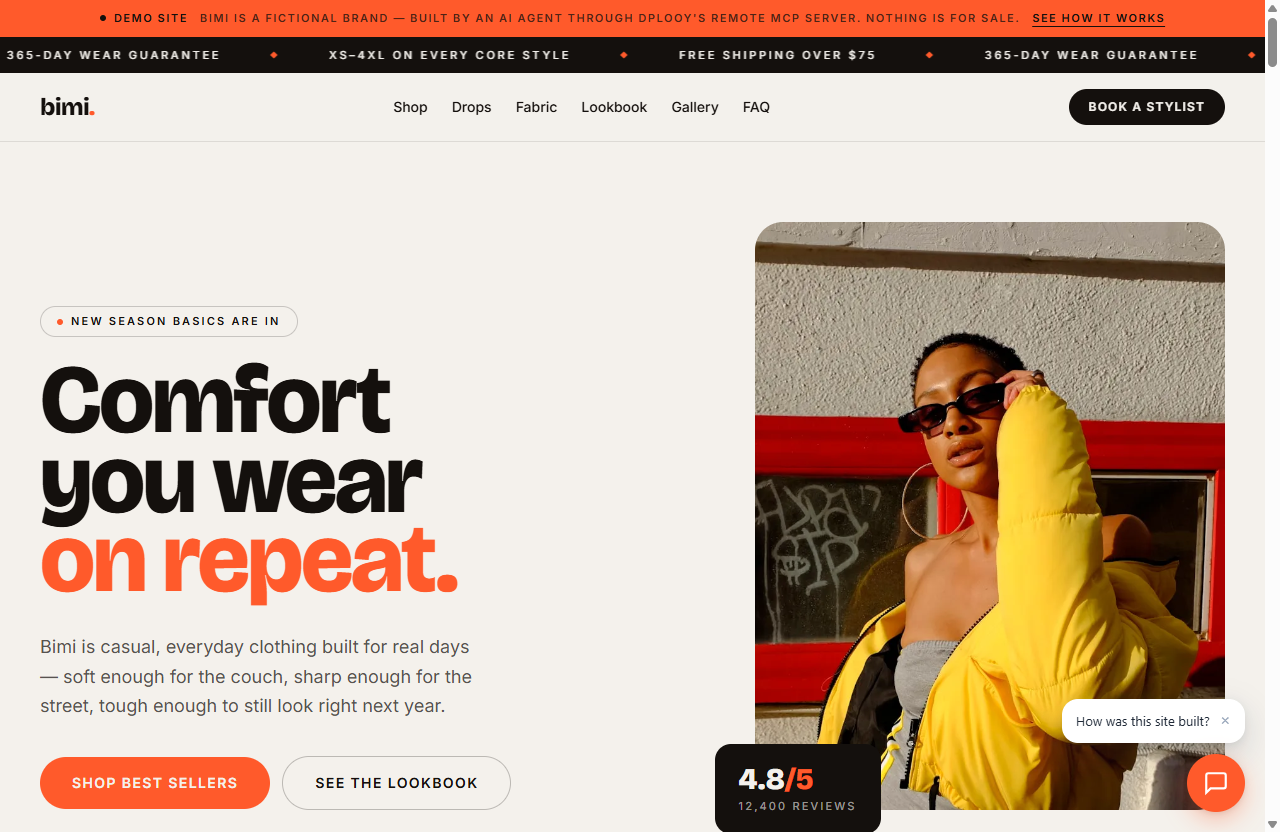
Not a mockup — Bimi is a live showcase site, built exactly this way in one conversation. Visit it live →
An agent with real tools, not a chatbot with opinions
Most AI assistants can write website code — and then hand you a zip file and wish you luck. Connected to Dplooy, the same assistant operates an actual hosting platform under your account.
- Gives you code you have to deploy yourself
- Contact forms that post nowhere
- Images hot-linked from sites that may vanish
- Content hardcoded — every change is a code change
- No URL, no SSL, no analytics, no inbox
- Deploys to a live yourname.dplooy.com URL with SSL
- Forms with a real inbox, spam protection and email alerts
- Every image ingested, optimized and served from your library
- Content in editable collections — update without redeploying
- Bookings, chatbot, analytics — all in your dashboard
Connect your AI assistant
Create a free Dplooy account, then paste one URL into your assistant’s connector settings. Authentication is a sign-in and an approval — no API key is ever copied or pasted.
https://api.dplooy.com/mcpOn claude.ai
- 1Open Settings → Connectors
- 2Choose “Add custom connector”
- 3Paste the Dplooy server URL above
- 4Sign in to Dplooy and approve — done
On ChatGPT
- 1Open Settings → Connectors → Advanced settings
- 2Enable Developer mode, then choose Create
- 3Paste the Dplooy server URL, sign in and approve
- 4In a chat, enable Dplooy from the composer's tools menu
Custom connectors on claude.ai require a paid Claude plan, and ChatGPT exposes custom connectors through developer mode on its paid plans. The Dplooy side is free on every plan. If your assistant later can’t find the Dplooy tools, toggle the connector off and on and start a new conversation — assistants cache the tool list when a chat begins.
Using Claude Code, Cursor or Windsurf instead? The same connection works there too, plus a local package for deploying folders from your machine — setup for every client is on the MCP server page.
Describe the website you want
No magic syntax — just a normal message. Below is the shape of the prompt that built Bimi, and why each part matters: everything real you supply is something the agent doesn’t have to invent.
1Build a single-page website for Bimi, my casual & comfort daily-wear clothing brand. 2Sections: shop by category, best sellers, why Bimi, lookbook, reviews, FAQ, early-access signup — and let people book a free 30-minute virtual fit session with a stylist. Tone: warm and plain-spoken. Colors: bone, ink and a clay-orange accent. 3Real products: The Everyday Tee $28, Sunday Fleece Hoodie $64, Easy Straight Denim $78, Soft Rib Knit $56, Off-Duty Wide Pant $68, Weekend Overshirt $82. Sizes XS–4XL, free shipping over $75. 4Send early-access signups and fit-session requests to [your email] — guests should see replies from that same address.
Why this prompt works
Name, what the business does, and where. The agent builds around a real identity instead of a template.
Name them and the agent structures the whole site around them — including the form and the booking widget.
Your actual products, prices and sizes. Anything you don't supply, the agent has to invent — and invented details are what you end up correcting.
The email that receives form submissions and booking requests, and the reply address your guests see.
Before building, the agent asks back
Single-file is recommended — one fast page. It can’t grow extra pages later without a full redeploy, so it’s decided up front.
Leave either out and both default to your Dplooy account email.
What actually happens behind the scenes
Your agent follows a strict build order — the same one every time. Each step is a real tool call you can watch in the chat, and everything it creates shows up in your dashboard.
It reads your account first
get_accountBefore designing anything, the agent checks your plan and the exact features available to it — how many sites, whether forms and bookings are unlocked, how much media space is left. It designs only within what your plan allows, and tells you what an upgrade would add instead of failing halfway through.
It sets up the moving parts
create_data_collection · create_form · create_booking_pageEvery repeating section of the site — Bimi's shop categories, best sellers, lookbook, reviews, FAQ — becomes an editable content collection instead of hardcoded HTML. The signup form gets a real backend endpoint, and the fit-session booking page is created with your notification email. All of it exists before the site does, waiting to be wired in.
It ingests every image
upload_mediaImages go into your Media Library in batches — automatically optimized to WebP, resized to a sensible maximum, and given stable short URLs. The site never hot-links a fragile external image; every picture it uses is one you now own in your library.
It writes the site around real infrastructure
The HTML is written mobile-first with Tailwind utilities, and the snippets returned by each tool — the form endpoint, the data fetch, the booking widget — are embedded exactly as issued. Nothing on the page is a fake placeholder pretending to work; every button and form is wired to something real.
It deploys
deploy_website · deploy_filesThe files run through the same security scan as every dashboard deploy — malware and phishing checks before anything goes live — then land in cloud storage with every file path mapped for serving. Seconds later the site is live at yourname.dplooy.com with SSL.
It wires everything together
assign_to_projectThe collections, the form and the booking page get assigned to the new site. This is the moment the site becomes a running business tool: the form starts accepting submissions, the collections start serving content, and the booking widget goes live.
It teaches the chatbot
configure_chatbotOn Plus and Pro, the agent enables the site's AI chatbot and writes its knowledge base from the content it just authored — Bimi's real products, prices and policies, never invented facts. Visitors get answers 24/7 from day one.
And then it hands you the code
Deploying is not the whole deliverable. The agent is instructed to give you the complete source of every build and every edit right in the chat — so you always own a copy of exactly what was published, and any developer can pick it up later.
How the hosting works
When your agent deploys, it goes through the exact same pipeline as a dashboard upload — there is no separate “AI lane” with weaker checks, and nothing about the site marks it as machine-built.
By the time the link comes back in the chat, the site is already a first-class project in your account. And there’s no lock-in: it’s plain HTML, CSS and JavaScript, and the agent hands you the complete source in the conversation — your code works anywhere.
You describe, the agent builds — files, images and settings travel straight from the chat. Nothing for you to upload or configure.
Everything flows through api.dplooy.com/mcp, scoped to your account by the connection you approved — revocable in one click from Settings.
Before anything goes live, the HTML, CSS and JavaScript are checked for malware and phishing — every deploy, no exceptions.
Every file is stored and given its route on your site at deploy time, then served with caching. No build step, no waiting.
Seconds later the site is up with free SSL and sitting in your dashboard — analytics, settings and access control included.
One static site, five live services
This is what makes an agent-built Dplooy site different from generated code: the page itself is fast static HTML, and everything dynamic is a Dplooy service attached to it.
Dplooy Data
Your menu, services and testimonials live in editable collections, not hardcoded HTML — served pre-rendered for SEO and kept live by the hosted runtime. Change a price by telling the AI, or open the collection in your dashboard and edit the item. No redeploy.
Learn moreDplooy Forms
A real form backend behind your contact form: submissions inbox, hidden spam trap, an email to you on every submission, and CSV export. The agent embeds the endpoint — visitors' messages actually arrive.
Learn moreDplooy Bookings
An approval-based booking widget styled to match your site. Nothing is confirmed until you approve it, and both you and the guest get emails through the whole request → decision lifecycle.
Learn moreMedia Library
Every image the agent uses is ingested into your library — optimized to WebP, resized, and served from stable short URLs that never expire. No hot-links, no broken images six months later.
Learn moreAI Chatbot
A chat widget on your live site that answers visitors from a knowledge base written out of your site's actual content. The agent configures it as the final build step.
Learn moreAnd your dashboard sees it all
Everything the agent creates is a normal project in your Dplooy dashboard — submissions, booking requests, Data collections, analytics. Nothing is locked inside the chat.
How editing worksTwo ways to change anything
Ask the agent, or open the dashboard. Both operate on the same live site, so you can mix them freely.
Ask the agent
The agent reads the live site’s source, makes precise, targeted edits — never a risky full rewrite — and the change is live in seconds. Content changes like prices and hours are edits to your Data collections, so the site updates without touching code at all.
Or do it yourself
Everything the agent creates is a normal project in your Dplooy dashboard. Each project’s settings panel gives you hands-on control — no conversation required:
What your agent can build, per plan
The agent checks these limits before it designs anything, so it never promises a feature your plan doesn’t include.
Full details on the pricing page.
Frequently asked questions
Can an AI agent really build and host a website for me?
Yes. Once Claude or ChatGPT is connected to Dplooy, it stops describing websites and starts operating real hosting: it creates the site, uploads the images, publishes it to a live URL under your account, wires up forms and bookings, and edits it later when you ask. You watch every step happen in the chat, and everything it creates appears in your Dplooy dashboard.
How do I connect Claude to Dplooy?
On claude.ai, open Settings → Connectors, choose “Add custom connector”, and paste https://api.dplooy.com/mcp as the server URL. Claude opens a Dplooy sign-in window; approve the connection and you're done — no API key, nothing to install. Custom connectors on claude.ai require a paid Claude plan.
How do I connect ChatGPT to an MCP server?
In ChatGPT, open Settings → Connectors, then under Advanced settings enable Developer mode. A Create button appears — create a connector, paste https://api.dplooy.com/mcp as the server URL, and approve the Dplooy sign-in. In a chat, enable the connector from the composer's tools menu. Connectors are available on ChatGPT's paid plans.
Do I need an API key?
Not for the remote connection. It uses OAuth: you paste one URL, sign in to Dplooy, and approve on a Dplooy consent screen — no key is ever copied or pasted, and you can revoke the connection any time from Settings → Connections. The optional local package for Claude Code, Cursor and Windsurf uses an API key from Settings → API Keys instead.
What should I say to the AI to get a good website?
Be concrete. Name the business, say what it does and where, list the sections you want, and paste real details — menu, prices, opening hours, testimonials. Tell it which email should receive form submissions and booking requests. Anything you don't supply, the assistant has to invent, and invented business details are the main reason a site needs correcting afterwards.
What happens when the AI deploys my website?
The files are security-scanned for malware and phishing, stored in cloud storage, and every file path is mapped so the site serves like a CDN. Your site is live at yourname.dplooy.com with free SSL within seconds, and the project appears in your dashboard with analytics and settings — exactly as if you had uploaded it yourself.
Can the AI add a contact form or a booking system to my website?
Yes. On Plus and Pro, the agent creates a real form backend (submissions inbox, spam protection, email notifications, CSV export) and an approval-based booking page (nothing is confirmed until you approve it), then wires both into the site it builds. Editable content collections work on every plan, including Free.
How do I edit the website after the AI builds it?
Two ways, and you can mix them. Ask the AI: it reads the live source and makes targeted edits that go live in seconds — content changes like prices or hours don't even need a redeploy. Or use your dashboard: every project has a settings panel with a point-and-click visual editor, your form submissions, your bookings calendar, editable data rows, and more.
Is it free to build a website with an AI agent?
Yes — connecting is free and the free plan hosts 3 websites with editable content collections and the media library, no credit card required. Free sites expire after 3 days; Plus ($4.99/mo) and Pro ($12.99/mo) remove expiry and unlock forms, bookings and the AI chatbot.
Where is my website hosted, and what URL do I get?
Dplooy hosts it. Every site gets a free yourname.dplooy.com address with SSL the moment it deploys. On the Pro plan you can connect a custom domain you own from the dashboard once the site is live.
Which AI apps work with Dplooy?
claude.ai and ChatGPT connect remotely with one URL — no install. Claude Code, Claude Desktop, Cursor and Windsurf can use the same remote URL or run the local npm package (@dplooy/mcp-server) with an API key, which adds one extra ability: deploying a folder that already exists on your computer.
Do I own the website and the code?
Yes. The site lives in your own Dplooy account, and the agent is instructed to hand you the complete source code in the chat on every build and every edit — so you always keep a copy of exactly what was published.
Is it safe to let an AI agent deploy code?
Every deploy — AI or human — runs through the same security scanner that checks for malware and phishing before anything goes live, and obvious brand-impersonation site names are blocked. The connection itself is scoped to your account, listed in Settings → Connections, and revocable with one click.
What is MCP (Model Context Protocol)?
MCP is an open standard, created by Anthropic, that lets AI assistants use external tools. Dplooy exposes its hosting platform as MCP tools — deploy, media, forms, data, bookings, chatbot — so any MCP-capable assistant can operate it. That's the whole integration: one protocol, one URL.
Can the AI keep my site's content up to date?
Yes — that's the point of content collections. Your products, services, testimonials or FAQ live in editable collections, not hardcoded HTML. Say “drop the hoodie to $58” and the agent edits the item; the live site updates without touching code. You can open the same collection in your dashboard and edit items yourself.
Keep reading
Your next website is one conversation away
Create a free account, paste one URL into Claude or ChatGPT, and describe the site you want. No credit card, no install, no code.