Upload HTML File Online FreeGet a Live Link in Seconds
Free drag and drop hosting for single page websites — landing pages, portfolios, resumes and more. Upload your HTML file, get a live link with free SSL. No coding required.
- No credit card
- Free SSL included
- Live in 60 seconds


- Upload to live link
- 60s
- Uptime
- 99.9%
- Per HTML file, free
- 5MB
- Free certificate
- SSL
How to Upload an HTML File Online
From HTML file to live link in under 60 seconds. Just drag, drop, and deploy.
- 1
Drop your HTML file
Drag your index.html — or any .html page — onto the uploader in your dashboard, or click Browse files.
- 2
Name your link
Pick the name for your address, like yourname.dplooy.com. Free SSL is added automatically.
- 3
Click Deploy and share
Your HTML page is live. Copy the link, show the QR code, or send it — anyone can open it in a browser.


Free HTML File Hosting
One free HTML uploader for all of it: host an HTML file online, share it as a link, or keep it up only as long as you need.


Upload an HTML file to a website
Drop the file and it becomes a website at yourname.dplooy.com. No FTP, no server, no coding required.
Host an HTML file online
Free SSL on every page. Files served from edge locations worldwide for fast loading speeds everywhere.
Share an HTML file online
Copy the link, show the QR code, or send it. Anyone opens it in a browser — nothing to download.
Deploy HTML instantly
From file to live URL in under a minute. Replace the file later and the same link shows the new page.
Host a single HTML file free
3 free sites, up to 5MB per HTML file, your own subdomain. No credit card.
Temporary HTML hosting
A free page stays online for 3 days — enough to share, review or demo. Upgrade to keep it for good.
What Can You Host as a Single Page Website?
Anything that fits in one HTML page — and one link is all you need to share it.
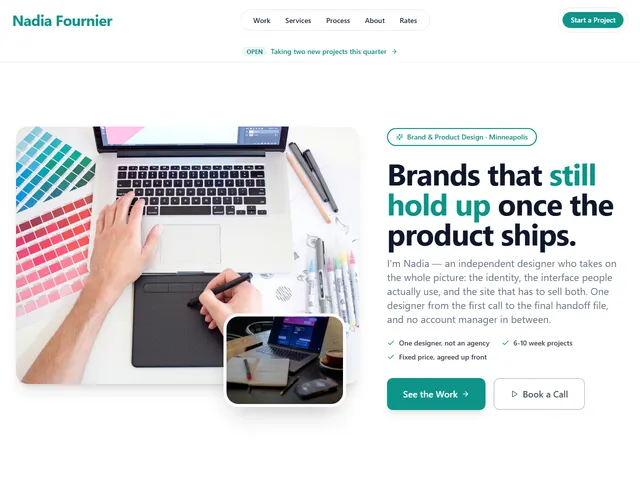
Portfolio
A one-page portfolio you can hand out as a link.
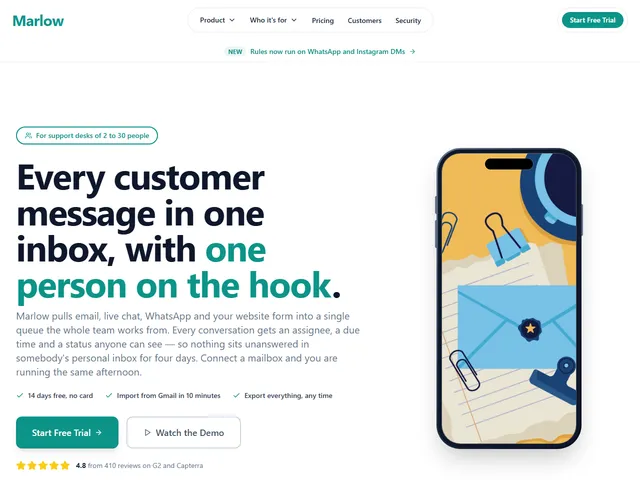
Landing page
A launch or campaign page, live before the campaign starts.
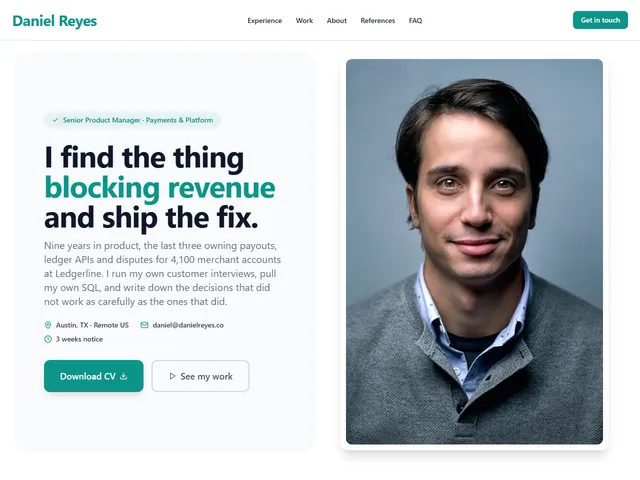
Resume
Your CV as a web page instead of an attachment.

HTML proposal
Share an HTML proposal or mockup with a client as one link.

Event page
The date, the place and the details on one page.
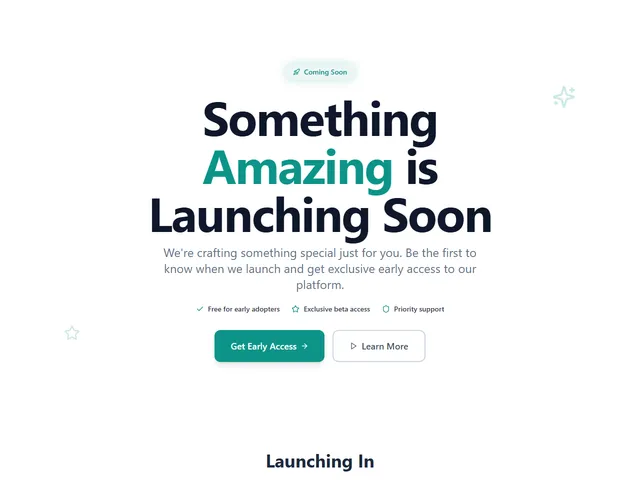
Coming soon page
Put one page up while the real site is being built.
Every HTML Page You Upload, in One Dashboard
Real-time analytics
Views, visitors and storage for every page you upload.
Quick actions
Copy the link, make a QR code, replace the HTML file.
Smart organization
Search your pages and sort them by date or views.


Is one page actually enough?
Most of the time, yes — and a single page will always load faster than the five-page version of the same thing. Here's the line.
One page is enough when
- Everything fits in one scroll — a portfolio, a launch, a menu, a CV
- You want one link to hand out, not a site to navigate
- The HTML file already exists — an export, a template, a page an AI wrote
- You'd rather update it by replacing the file than by editing a site
You've outgrown it when
- You need separate URLs people can link to directly — that's a multi-page site.
- You have a folder of HTML, CSS, JS and images — upload it as a ZIP deploy.
- You're running a build step or a framework — that's ordinary static website hosting.
- You don't have the page yet — start in the site builder.
Same account, same free tier — nothing to migrate if you switch later.
Upload HTML Free: Questions
Hosting and sharing an HTML file online, answered.
How do I upload an HTML file online for free?
Three steps, no credit card:
- 1Create a free dplooy account and open your dashboard.
- 2Drop your HTML file on the box that says Drop anything. We figure out the rest. — or click Browse files.
- 3Give it a name and click Deploy. Your page is live at
yourname.dplooy.comwith free SSL.
How do I upload an HTML file to a website for free?
You don't need a website first — uploading the HTML file creates one. Your file goes live at its own address, yourname.dplooy.com, with free SSL. On the Pro plan you can connect a domain you already own instead.
How do I share an HTML file online?
Upload it and share the link. The HTML file becomes a live page anyone can open in a browser — copy the link, send it, or show it as a QR code. There is nothing for them to download or install.
Can I host a single HTML file for free?
Yes. The free plan hosts up to 3 sites, each HTML file up to 5MB, with free SSL, unlimited traffic and your own dplooy.com subdomain. No credit card required.
Is there temporary HTML hosting?
Yes — that is what the free plan is. A free page stays online for 3 days, long enough to share, review or demo it, then goes offline and is deleted 7 days later. Upgrade to Plus or Pro before then to keep it at the same address for good.
Is dplooy a free website uploader?
Yes. Drop one HTML file and it goes live as a page. To upload a whole website free — HTML with separate CSS, JavaScript and images — drop the folder or a ZIP file instead. Each gets its own live link.
Can I deploy HTML instantly?
Yes. Your HTML file is typically live within 60 seconds of upload — drop it, name it, click Deploy. There is no build step, no server and no FTP.
Can my HTML file use CSS, JavaScript and images?
Yes. CSS and JavaScript written inside the HTML file work as they are, and so do images linked by a full https:// address. If your page has separate .css, .js or image files, upload the folder or a ZIP so they are hosted with it.
What's the maximum HTML file size?
Free plan: 5MB per file, 50MB total storage. Plus plan: 50MB per file, 500MB total. Pro plan: 100MB per file, 5GB total storage.
Can I update my HTML file after uploading?
Yes. On every plan, Replace file on the project swaps in a new HTML file at the same address with your settings intact, and on Plus and Pro the page you replaced is kept in Versions. Pro users can also edit the code directly in the built-in code editor. Changes go live instantly with no downtime.
Is my HTML page secure?
Yes. Every hosted page gets a free SSL certificate for HTTPS encryption. Files are served from our global CDN for fast, secure delivery worldwide.
Can I use my own domain?
Free and Plus users get a custom subdomain (yourname.dplooy.com). Pro plan supports custom domains — connect any domain you own.
Step-by-step walkthroughs
- Host an HTML websiteOne file, one URL, start to finish.Read the guide
- Deploy a landing pageGet a campaign page live before the campaign starts.Read the guide
- Host a portfolioPut your work somewhere that isn't a social profile.Read the guide
- Share files onlineHand someone a link instead of an attachment.Read the guide
Upload Your HTML File Free
No credit card required. Free pages run for 3 days before they expire — upgrade any time to keep one up for good.
Upload HTML Free- Free sites
- 3
- Free storage
- 50MB
- Per HTML file
- 5MB
- Free certificate
- SSL